I’ve discovered Linux in 1995 and I have been using it as my only home/work operating system since then. I still love it and want to continue to use and promote it, but in the last 2/3 weeks it’s become almost impossible. In this page I explain why, hoping to get and collect useful suggestions.
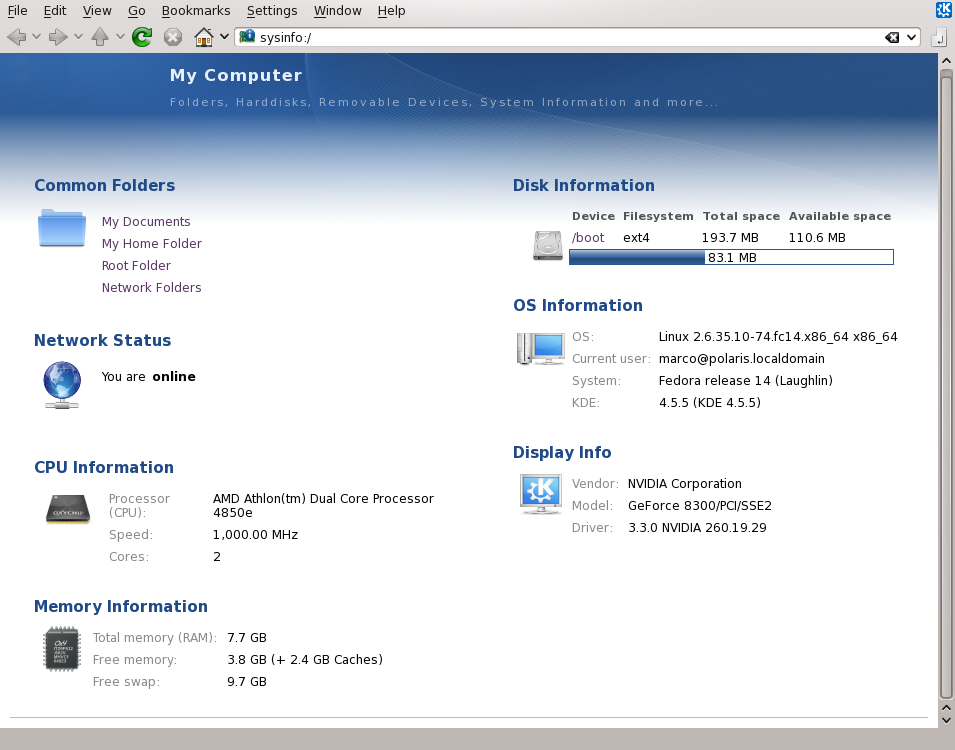
First, hardware and software details. These days, I’m using Fedora 14 x86_64 on a computer with an ASUS M3N78-EM motherboard and 8 GB of RAM. Other details of the configuration are shown in the sysinfo screenshot. I am running Firefox and Flash from the Fedora packages firefox-3.6.13-1.fc14.x86_64 and flash-plugin-10.1.102.65-release.i386. Strigi is not running, Nepomuk and desktop effects are disabled. The output of rpm -qa | egrep -i 'nvidia|xorg|x11' is here.
Next, how I (try to) use this box. 95% of the time, all I need is a Web browser, an office suite, a text editor, an email client and a couple of terminals for SSH and other console work. So I always have Firefox (20/30 tabs open on Facebook, Twitter and news sites of all sorts) Kate, mutt in one Gnome or KDE console with 3/4 tabs, sometimes OpenOffice. There are also a Dovecot server for a local IMAP email archive and MySql + Apache for a couple of very light LAMP application of which I’m the only, local user.
Everything described below was already happening, albeit in a much lighter form, with previous versions of Fedora. However, about twenty days ago I upgraded from Fedora 12 to Fedora 14 and since then everything became disgustingly slow. Here’s how.
In Firefox, just about every single BASIC operation takes at least 3/4 seconds to happen, counting from the moment when I do something to when Firefox has done it: scroll down a window, reopen it them after it was iconized, move from one tab to another, highlight and copy text from a window or past the same text in another one… EVERY time I do one of these and similar things I have to wait. When I tweet, Firefox is still showing the first 20/30 characters when I have already typed all 140 of them.
Oh, and I have to killall Firefox myself daily, because it completely freezes. Doing this about once a day is enough, because Firefox already crashes by itself 4/5 times every single day.
Using Kate is a similar nightmare: it always takes at least 1/2 seconds from when I click somewhere else in the text to when the cursor reappears there. Every time I press CTRL-S to save plain text files as small as this one, I have to wait 1/2 seconds before Kate unfreezes and I can resume work.
Sometimes, not always but quite often, when typing fast, the text displayed in the Kate window is regularly several words behind what I’m typing. What I mean here is that while I was typing “Hello” in this sentence you’re reading right now, X and Kate were still panting to display the last words of the previous sentence. Another very common thing is to just miss some keystrokes. I’m fast, but not that fast.
If I have two or more plain text files open in Kate, they show in the “Documents” pane on the left of the window. If I click on one of them it’s 2/3 other seconds from the click to when I see that file. Using other text editors doesn’t make any meaningful difference. In OpenOffice, it’s more or less the same story.
Desktop-wise, if ANY window fills the whole screen, I iconize and then maximize it, by clicking on its icon in the panel, it takes 3/4 seconds to display it again. Even if it’s a window, like Kate’s, that only contains ASCII text.
Using Gnome or KDE doesn’t change anything. Finally, in case anybody were thinking “use Chrome”, I haven’t done it yet simply because very little would change. It makes very little or no difference whether Firefox is running or not: Kate and everything else will still behave like if they’re carrying a whole herd of dinosaurs on their backs, even if there is no browser running.
I could continue, but it would take too much time to type, so let’s conclude.
I am sitting in front of a dual core processor that toggles many hundreds of millions of times each second, that is orders of magnitudes faster than my own brain; a processor whose available working area (billions of bytes of RAM) is several orders of magnitudes bigger than the combined size of all the files (be they local or web pages) I have open at any given moment.
Still, I am having really serious performance problems with basic computing activities that were absolutely standard and average 15 years ago. I’m not compiling, playing 3D games, editing video or anything of that sort. I’m only trying to read and write text, for heaven’s sake. This is stuff that any computer and operating system around these days should do much faster than any human. The user should be the bottleneck, not hardware or software drivers.
If this were a hardware problem of any kind, by now the computer would be dead or I would have had some serious data loss. Nothing of this happened. Probably, a good part of the problem is in some weird X/nVidia/kernel interaction, or lack thereof, but can it really justify this behavior? Opening and closing windows and tabs, typing text… this is stuff that even with a suboptimal or misconfigured driver should be instantaneous. No?
For the same reason, I like Fedora but would have no problem to use Fedora 32 bit, or another distro; but I would do that only if I were sure that it is a distro-specific issue, which doesn’t seem to me, and that a switch would eliminate these problems. The fact that I had them even before Fedora 14, or things like Shuttleworth saying he wants Ubuntu to become more responsive, make me think I’m just a serious example of a very general issue. Also, changing the hardware is NOT an option, as a matter of principle. That’s what Windows users do. I’d buy a new computer only if I were SURE that there is no other way to work decently, because this one is so old (2 years???) that it can’t keep up with current Free Software. And if this were the case (which I am sure is not), it would be so bad to make me go for Mac OS.
Changing window manager ordesktop environment? Gnome and KDE both suck as described, maybe KDE is slightly slower. Sure, I will try to run fluxbox as soon as I can, and personally I’d have no problem to use it. But it can’t be that simple, if KDe and Gnome always behaved like I’m seeing now, nobody would be using them anymore.
Besides… OK, sure, I can use fluxbox myself, but I would really like to not do that, for advocacy reasons. It’s a solution for me, but for Linux and Free Software is a defeat. If installing fluxbox or something similar is indeed the only way to make this box run decently, it will be OK for me, but I’ll also have to give up any hope to convince people passing by (starting from family members) to “here, try Linux, don’t you see how fast and complete and friendly and cool looking it looks by default these days?”
I know very well that Linux and Free Software are great, but here and now they are disgusting, really. All in all, I estimate that since the upgrade I’ve been wasting from 30 to 60 minutes every day for these things, for about twenty days now. I can’t go on like this. I want to continue to use Linux, but I need help to understand exactly what’s happening, and how to fix it for good as soon as possible. Thanks in advance, seriously, for any feedback (*), I’ll collect and publish here, as a separate “solution” page, any useful tip I get.
(*) if you want me to run specific tests or provide more system info, just ask. Also, I will try to follow discussions online about this, but please keep in mind that the best way to be sure that I read your suggestions and to share them with all other readers of this page is to put them here as comments.
Caught a worm? Try to boot the system without net.
I think you might of missed the part where he mentions that he runs Linux.
Sharing here an answer I just gave on Facebook to a suggestion to switch to a lighter window manager like fluxbox instead of Gnome or KDE:
The real question here is “can it really be possible that the DEFAULT graphical Linux environments of 2010/2011 make a generic 3 year old computer WITH 8 GB OF RAM unusable for very basic desktop stuff???”
I do know how to use fluxbox, but I find very hard to accept, and a defeat for Linux, that it is really necessary to use it for doing little more than browsing the net and using a text editor on 8GB of RAM
Something’s seriously wrong, because I’ve used F14 on much lighter system configurations without problems. Right now, for example, I’m using F14 on a 1GB Atom netbook (with an additional 1680×1050 external screen) and it’s quite responsive.
It would be worth examining your resource utilization. The ‘free’ command will show memory utilization, and the output of “vmstat 10 10″ will capture 100 seconds of system activity (disk I/O, memory utilization, and CPU utilization) at 10-second intervals. Posting that would be helpful.
The “top” tool is also useful in identifying CPU and memory hogs. Running it will produce a list, updated at 3 second intervals, of the top CPU-using programs. Pressing Shift-M will change the display to show the top memory-using programs; pressing Shift-P will switch back to the CPU usage display.
Of your usage pattern, only the number of tabs open in the browser sounds high — web pages take a considerable amount of memory to store, and opening a lot of tabs can consume a lot of memory. Web scripts can also slow your machine considerably, as can badly-behaved (is there any other kind?) Flash on web pages. All of these will show up as excessive resource usage by your browser; if you want to narrow it down to a specific tab, your easiest solution is to close down the browser completely and start up your favorite tabs one at a time (alas, closing a tab doesn’t necessarily free Flash resources associated with that tab).
Chris,
yes, something is seriously wrong, I’m sure about that and I am glad that other users confirm that Fedora (which I like a lot) can do much better than this. I agree that I am a heavy browser user, but things change little without no browser at all, that what’s puzzling me. If running no browser had made any meaningful difference I’d have already tried Firefox 4 beta or Chrome. Anyway, here are the outputs of the commands you requested:
[marco@polaris ~]$ free
total used free shared buffers cached
Mem: 8065172 2444892 5620280 0 110808 1116992
-/+ buffers/cache: 1217092 6848080
Swap: 10174460 0 10174460
[marco@polaris ~]$ top
top - 15:48:09 up 4:28, 6 users, load average: 0.44, 0.37, 0.40
Tasks: 195 total, 1 running, 194 sleeping, 0 stopped, 0 zombie
Cpu(s): 12.0%us, 0.7%sy, 0.0%ni, 86.3%id, 1.0%wa, 0.0%hi, 0.0%si, 0.0%st
Mem: 8065172k total, 2445144k used, 5620028k free, 110872k buffers
Swap: 10174460k total, 0k used, 10174460k free, 1117100k cached
PID USER PR NI VIRT RES SHR S %CPU %MEM TIME+ COMMAND
2608 marco 20 0 1438m 586m 31m S 24.6 7.4 96:00.54 firefox
2374 marco 20 0 563m 45m 25m S 0.0 0.6 0:01.06 python
1832 root 20 0 141m 40m 10m S 0.7 0.5 15:36.98 Xorg
2776 marco 20 0 3346m 39m 10m S 0.0 0.5 0:18.37 java
2235 marco 20 0 828m 39m 25m S 0.0 0.5 0:17.42 plasma-desktop
2233 marco 20 0 1156m 37m 16m S 0.0 0.5 0:01.48 knotify4
2231 marco 20 0 589m 34m 26m S 0.0 0.4 0:25.81 kwin
2307 marco 20 0 725m 30m 20m S 0.0 0.4 0:05.99 krunner
2245 marco 20 0 1071m 27m 3600 S 0.0 0.4 0:15.56 mysqld
2229 marco 20 0 566m 26m 23m S 0.0 0.3 0:01.08 ksmserver
2198 marco 20 0 618m 21m 16m S 0.0 0.3 0:02.41 kded4
1545 mysql 20 0 350m 16m 3024 S 0.0 0.2 0:15.02 mysqld
2314 marco 20 0 642m 16m 12m S 0.0 0.2 0:01.40 nautilus
1769 root 20 0 300m 15m 7504 S 0.0 0.2 0:00.88 httpd
2313 marco 20 0 454m 15m 12m S 0.0 0.2 0:00.28 polkit-kde-auth
2316 marco 20 0 458m 14m 10m S 0.3 0.2 0:29.45 gnome-terminal
2272 marco 20 0 396m 14m 11m S 0.0 0.2 0:00.29 akonadi_ical_re
2273 marco 20 0 385m 14m 10m S 0.0 0.2 0:00.27 akonadi_maildir
6218 marco 20 0 100m 14m 8648 S 0.0 0.2 0:06.17 npviewer.bin
2579 marco 20 0 368m 14m 11m S 0.0 0.2 0:00.93 klipper
2271 marco 20 0 395m 13m 11m S 0.0 0.2 0:00.25 akonadi_ical_re
2298 marco 20 0 397m 13m 11m S 0.0 0.2 0:00.96 kaccess
2274 marco 20 0 381m 13m 10m S 0.0 0.2 0:00.25 akonadi_maildis
2275 marco 20 0 451m 13m 10m S 0.0 0.2 0:00.26 akonadi_nepomuk
2276 marco 20 0 379m 13m 10m S 0.0 0.2 0:00.21 akonadi_vcard_r
2398 marco 20 0 266m 12m 2716 S 0.0 0.2 0:00.23 python
2207 marco 20 0 368m 11m 9316 S 0.0 0.2 0:00.46 kglobalaccel
2238 marco 20 0 368m 10m 9044 S 0.0 0.1 0:00.25 kuiserver
and here’s the output of “vmstat 10 10″
[marco@polaris ~]$ vmstat 10 10
procs -----------memory---------- ---swap-- -----io---- --system-- -----cpu-----
r b swpd free buff cache si so bi bo in cs us sy id wa st
1 0 0 5618680 110944 1117092 0 0 36 26 928 34 41 5 54 1 0
2 0 0 5622144 110968 1117140 0 0 0 72 836 814 23 1 75 1 0
2 0 0 5622144 110976 1117140 0 0 0 9 687 690 17 0 82 0 0
0 0 0 5622144 110984 1117140 0 0 0 11 613 622 15 0 84 0 0
0 0 0 5620532 110996 1117140 0 0 0 9 627 670 14 1 85 0 0
1 0 0 5628964 111000 1117140 0 0 0 5 642 629 16 1 83 0 0
3 0 0 5628964 111008 1117140 0 0 0 3 625 619 15 0 84 0 0
0 0 0 5623724 111024 1117168 0 0 0 73 868 870 21 1 78 1 0
0 0 0 5623724 111040 1117160 0 0 0 9 734 869 14 1 84 1 0
1 0 0 5623600 111048 1117168 0 0 0 2 714 858 14 1 85 0 0
The things that stand out there:
- memory doesn’t seem cramped.
- CPU is not pegged
- interrupt rate for the amount of disk I/O being performed seems high
Have you posted/could you post your /var/log/Xorg.*.log files?
This is the most recent one:
[ 24.991]”
X.Org X Server 1.9.3
Release Date: 2010-12-13
[ 24.991] X Protocol Version 11, Revision 0
[ 24.991] Build Operating System: x86-18 2.6.32-71.el6.x86_64
[ 24.991] Current Operating System: Linux polaris.localdomain 2.6.35.10-74.fc14.x86_64 #1 SMP Thu Dec 23 16:04:50 UTC 2010 x86_64
[ 24.991] Kernel command line: ro root=/dev/mapper/vg_polaris-lv_root LANG=en_US.UTF-8 SYSFONT=latarcyrheb-sun16 KEYBOARDTYPE=pc KEYTABLE=it rhgb quiet rdblacklist=nouveau
[ 24.991] Build Date: 14 January 2011 12:48:20AM
[ 24.991] Build ID: xorg-x11-server 1.9.3-4.fc14
[ 24.991] Current version of pixman: 0.18.4
[ 24.991] Before reporting problems, check http://wiki.x.org
to make sure that you have the latest version.
[ 24.991] Markers: (–) probed, (**) from config file, (==) default setting,
(++) from command line, (!!) notice, (II) informational,
(WW) warning, (EE) error, (NI) not implemented, (??) unknown.
[ 24.992] (==) Log file: “/var/log/Xorg.0.log”, Time: Sat Feb 12 11:20:15 2011
[ 25.016] (==) Using config file: “/etc/X11/xorg.conf”
[ 25.016] (==) Using config directory: “/etc/X11/xorg.conf.d”
[ 25.016] (==) Using system config directory “/usr/share/X11/xorg.conf.d”
[ 25.608] (==) No Layout section. Using the first Screen section.
[ 25.608] (==) No screen section available. Using defaults.
[ 25.608] (**) |–>Screen “Default Screen Section” (0)
[ 25.608] (**) | |–>Monitor “
[ 25.608] (==) No device specified for screen “Default Screen Section”.
Using the first device section listed.
[ 25.608] (**) | |–>Device “Videocard0″
[ 25.608] (==) No monitor specified for screen “Default Screen Section”.
Using a default monitor configuration.
[ 25.609] (**) Option “AIGLX” “on”
[ 25.609] (==) Automatically adding devices
[ 25.609] (==) Automatically enabling devices
[ 25.609] (==) FontPath set to:
catalogue:/etc/X11/fontpath.d,
built-ins
[ 25.609] (**) ModulePath set to “/usr/lib64/xorg/modules/extensions/nvidia,/usr/lib64/xorg/modules”
[ 25.609] (**) Extension “Composite” is enabled
[ 25.609] (II) The server relies on udev to provide the list of input devices.
If no devices become available, reconfigure udev or disable AutoAddDevices.
[ 25.609] (II)
***************************************************************
***************************************************************
** Fedora switched to udev-based device detection with **
** xorg-x11-server-1.7.99.901-1. Custom HAL configuration **
** stored in /etc/hal/fdi/policy will not be seen by this **
** server version. If you have such configuration you will **
** need to update it to the new format. **
** For more information, see the Fedora wiki page **
** https://fedoraproject.org/wiki/Input_device_configuration **
***************************************************************
***************************************************************
[ 25.609] (II) Loader magic: 0x7d29c0
[ 25.609] (II) Module ABI versions:
[ 25.609] X.Org ANSI C Emulation: 0.4
[ 25.609] X.Org Video Driver: 8.0
[ 25.609] X.Org XInput driver : 11.0
[ 25.609] X.Org Server Extension : 4.0
[ 25.611] (–) PCI:*(0:2:0:0) 10de:0848:1043:82f2 rev 162, Mem @ 0xfd000000/16777216, 0xf0000000/134217728, 0xfa000000/33554432, I/O @ 0x0000ec00/128, BIOS @ 0x????????/131072
[ 25.612] (II) LoadModule: “extmod”
[ 25.639] (II) Loading /usr/lib64/xorg/modules/extensions/libextmod.so
[ 25.640] (II) Module extmod: vendor=”X.Org Foundation”
[ 25.640] compiled for 1.9.3, module version = 1.0.0
[ 25.640] Module class: X.Org Server Extension
[ 25.640] ABI class: X.Org Server Extension, version 4.0
[ 25.640] (II) Loading extension SELinux
[ 25.640] (II) Loading extension MIT-SCREEN-SAVER
[ 25.640] (II) Loading extension XFree86-VidModeExtension
[ 25.640] (II) Loading extension XFree86-DGA
[ 25.640] (II) Loading extension DPMS
[ 25.640] (II) Loading extension XVideo
[ 25.640] (II) Loading extension XVideo-MotionCompensation
[ 25.640] (II) Loading extension X-Resource
[ 25.640] (II) LoadModule: “dbe”
[ 25.641] (II) Loading /usr/lib64/xorg/modules/extensions/libdbe.so
[ 25.641] (II) Module dbe: vendor=”X.Org Foundation”
[ 25.641] compiled for 1.9.3, module version = 1.0.0
[ 25.641] Module class: X.Org Server Extension
[ 25.641] ABI class: X.Org Server Extension, version 4.0
[ 25.641] (II) Loading extension DOUBLE-BUFFER
[ 25.641] (II) LoadModule: “glx”
[ 25.641] (II) Loading /usr/lib64/xorg/modules/extensions/nvidia/libglx.so
[ 25.972] (II) Module glx: vendor=”NVIDIA Corporation”
[ 25.990] compiled for 4.0.2, module version = 1.0.0
[ 25.990] Module class: X.Org Server Extension
[ 25.990] (II) NVIDIA GLX Module 260.19.29 Wed Dec 8 12:24:30 PST 2010
[ 25.990] (II) Loading extension GLX
[ 25.990] (II) LoadModule: “record”
[ 25.990] (II) Loading /usr/lib64/xorg/modules/extensions/librecord.so
[ 25.991] (II) Module record: vendor=”X.Org Foundation”
[ 25.991] compiled for 1.9.3, module version = 1.13.0
[ 25.991] Module class: X.Org Server Extension
[ 25.991] ABI class: X.Org Server Extension, version 4.0
[ 25.991] (II) Loading extension RECORD
[ 25.991] (II) LoadModule: “dri”
[ 25.991] (II) Loading /usr/lib64/xorg/modules/extensions/libdri.so
[ 25.992] (II) Module dri: vendor=”X.Org Foundation”
[ 25.992] compiled for 1.9.3, module version = 1.0.0
[ 25.992] ABI class: X.Org Server Extension, version 4.0
[ 25.992] (II) Loading extension XFree86-DRI
[ 25.992] (II) LoadModule: “dri2″
[ 25.993] (II) Loading /usr/lib64/xorg/modules/extensions/libdri2.so
[ 25.993] (II) Module dri2: vendor=”X.Org Foundation”
[ 25.993] compiled for 1.9.3, module version = 1.2.0
[ 25.993] ABI class: X.Org Server Extension, version 4.0
[ 25.993] (II) Loading extension DRI2
[ 25.993] (II) LoadModule: “nvidia”
[ 26.017] (II) Loading /usr/lib64/xorg/modules/drivers/nvidia_drv.so
[ 26.062] (II) Module nvidia: vendor=”NVIDIA Corporation”
[ 26.064] compiled for 4.0.2, module version = 1.0.0
[ 26.065] Module class: X.Org Video Driver
[ 26.089] (II) NVIDIA dlloader X Driver 260.19.29 Wed Dec 8 12:10:14 PST 2010
[ 26.089] (II) NVIDIA Unified Driver for all Supported NVIDIA GPUs
[ 26.089] (++) using VT number 1
[ 26.094] (II) Loading sub module “fb”
[ 26.094] (II) LoadModule: “fb”
[ 26.096] (II) Loading /usr/lib64/xorg/modules/libfb.so
[ 26.096] (II) Module fb: vendor=”X.Org Foundation”
[ 26.096] compiled for 1.9.3, module version = 1.0.0
[ 26.096] ABI class: X.Org ANSI C Emulation, version 0.4
[ 26.097] (II) Loading sub module “wfb”
[ 26.097] (II) LoadModule: “wfb”
[ 26.098] (II) Loading /usr/lib64/xorg/modules/libwfb.so
[ 26.098] (II) Module wfb: vendor=”X.Org Foundation”
[ 26.098] compiled for 1.9.3, module version = 1.0.0
[ 26.098] ABI class: X.Org ANSI C Emulation, version 0.4
[ 26.099] (II) Loading sub module “ramdac”
[ 26.099] (II) LoadModule: “ramdac”
[ 26.099] (II) Module “ramdac” already built-in
[ 26.135] (II) NVIDIA(0): Creating default Display subsection in Screen section
“Default Screen Section” for depth/fbbpp 24/32
[ 26.135] (==) NVIDIA(0): Depth 24, (==) framebuffer bpp 32
[ 26.135] (==) NVIDIA(0): RGB weight 888
[ 26.135] (==) NVIDIA(0): Default visual is TrueColor
[ 26.135] (==) NVIDIA(0): Using gamma correction (1.0, 1.0, 1.0)
[ 26.135] (**) NVIDIA(0): Option “AddARGBGLXVisuals” “True”
[ 26.143] (**) NVIDIA(0): Enabling RENDER acceleration
[ 26.143] (II) NVIDIA(0): Support for GLX with the Damage and Composite X extensions is
[ 26.143] (II) NVIDIA(0): enabled.
[ 26.669] (II) NVIDIA(0): NVIDIA GPU GeForce 8300 (C77) at PCI:2:0:0 (GPU-0)
[ 26.669] (–) NVIDIA(0): Memory: 524288 kBytes
[ 26.669] (–) NVIDIA(0): VideoBIOS: 62.77.2f.00.00
[ 26.669] (–) NVIDIA(0): Interlaced video modes are supported on this GPU
[ 26.669] (–) NVIDIA(0): Connected display device(s) on GeForce 8300 at PCI:2:0:0
[ 26.669] (–) NVIDIA(0): Samsung SyncMaster (DFP-0)
[ 26.669] (–) NVIDIA(0): Samsung SyncMaster (DFP-0): 165.0 MHz maximum pixel clock
[ 26.670] (–) NVIDIA(0): Samsung SyncMaster (DFP-0): Internal Single Link TMDS
[ 26.716] (II) NVIDIA(0): Assigned Display Device: DFP-0
[ 26.716] (==) NVIDIA(0):
[ 26.716] (==) NVIDIA(0): No modes were requested; the default mode “nvidia-auto-select”
[ 26.716] (==) NVIDIA(0): will be used as the requested mode.
[ 26.716] (==) NVIDIA(0):
[ 26.716] (II) NVIDIA(0): Validated modes:
[ 26.716] (II) NVIDIA(0): “nvidia-auto-select”
[ 26.716] (II) NVIDIA(0): Virtual screen size determined to be 1680 x 1050
[ 26.753] (–) NVIDIA(0): DPI set to (90, 88); computed from “UseEdidDpi” X config
[ 26.753] (–) NVIDIA(0): option
[ 26.753] (**) NVIDIA(0): Enabling 32-bit ARGB GLX visuals.
[ 26.753] (–) Depth 24 pixmap format is 32 bpp
[ 26.753] (II) NVIDIA: Using 768.00 MB of virtual memory for indirect memory access.
[ 26.754] (II) NVIDIA(0): Initialized GPU GART.
[ 26.761] (II) NVIDIA(0): Setting mode “nvidia-auto-select”
[ 26.827] (II) Loading extension NV-GLX
[ 26.847] (II) NVIDIA(0): Initialized OpenGL Acceleration
[ 26.855] (==) NVIDIA(0): Disabling shared memory pixmaps
[ 26.855] (II) NVIDIA(0): Initialized X Rendering Acceleration
[ 26.855] (==) NVIDIA(0): Backing store disabled
[ 26.855] (==) NVIDIA(0): Silken mouse enabled
[ 26.863] (==) NVIDIA(0): DPMS enabled
[ 26.863] (II) Loading extension NV-CONTROL
[ 26.864] (II) Loading extension XINERAMA
[ 26.864] (II) Loading sub module “dri2″
[ 26.864] (II) LoadModule: “dri2″
[ 26.864] (II) Reloading /usr/lib64/xorg/modules/extensions/libdri2.so
[ 26.864] (II) NVIDIA(0): [DRI2] Setup complete
[ 26.864] (==) RandR enabled
[ 26.864] (II) Initializing built-in extension Generic Event Extension
[ 26.864] (II) Initializing built-in extension SHAPE
[ 26.864] (II) Initializing built-in extension MIT-SHM
[ 26.864] (II) Initializing built-in extension XInputExtension
[ 26.864] (II) Initializing built-in extension XTEST
[ 26.864] (II) Initializing built-in extension BIG-REQUESTS
[ 26.864] (II) Initializing built-in extension SYNC
[ 26.864] (II) Initializing built-in extension XKEYBOARD
[ 26.864] (II) Initializing built-in extension XC-MISC
[ 26.864] (II) Initializing built-in extension XINERAMA
[ 26.864] (II) Initializing built-in extension XFIXES
[ 26.864] (II) Initializing built-in extension RENDER
[ 26.864] (II) Initializing built-in extension RANDR
[ 26.864] (II) Initializing built-in extension COMPOSITE
[ 26.864] (II) Initializing built-in extension DAMAGE
[ 26.864] (II) SELinux: Disabled on system
[ 26.867] (II) Initializing extension GLX
[ 27.449] (II) config/udev: Adding input device Power Button (/dev/input/event1)
[ 27.449] (**) Power Button: Applying InputClass “evdev keyboard catchall”
[ 27.449] (**) Power Button: Applying InputClass “system-setup-keyboard”
[ 27.449] (II) LoadModule: “evdev”
[ 27.450] (II) Loading /usr/lib64/xorg/modules/input/evdev_drv.so
[ 27.450] (II) Module evdev: vendor=”X.Org Foundation”
[ 27.450] compiled for 1.8.99.905, module version = 2.5.0
[ 27.450] Module class: X.Org XInput Driver
[ 27.450] ABI class: X.Org XInput driver, version 11.0
[ 27.450] (**) Power Button: always reports core events
[ 27.450] (**) Power Button: Device: “/dev/input/event1″
[ 27.451] (–) Power Button: Found keys
[ 27.451] (II) Power Button: Configuring as keyboard
[ 27.451] (II) XINPUT: Adding extended input device “Power Button” (type: KEYBOARD)
[ 27.451] (**) Option “xkb_rules” “evdev”
[ 27.451] (**) Option “xkb_model” “pc105″
[ 27.451] (**) Option “xkb_layout” “it”
[ 27.451] (**) Option “xkb_options” “terminate:ctrl_alt_bksp,”
[ 27.527] (II) config/udev: Adding input device Video Bus (/dev/input/event4)
[ 27.527] (**) Video Bus: Applying InputClass “evdev keyboard catchall”
[ 27.527] (**) Video Bus: Applying InputClass “system-setup-keyboard”
[ 27.527] (**) Video Bus: always reports core events
[ 27.527] (**) Video Bus: Device: “/dev/input/event4″
[ 27.531] (–) Video Bus: Found keys
[ 27.531] (II) Video Bus: Configuring as keyboard
[ 27.531] (II) XINPUT: Adding extended input device “Video Bus” (type: KEYBOARD)
[ 27.531] (**) Option “xkb_rules” “evdev”
[ 27.531] (**) Option “xkb_model” “pc105″
[ 27.531] (**) Option “xkb_layout” “it”
[ 27.531] (**) Option “xkb_options” “terminate:ctrl_alt_bksp,”
[ 27.534] (II) config/udev: Adding input device Power Button (/dev/input/event0)
[ 27.534] (**) Power Button: Applying InputClass “evdev keyboard catchall”
[ 27.534] (**) Power Button: Applying InputClass “system-setup-keyboard”
[ 27.534] (**) Power Button: always reports core events
[ 27.534] (**) Power Button: Device: “/dev/input/event0″
[ 27.534] (–) Power Button: Found keys
[ 27.534] (II) Power Button: Configuring as keyboard
[ 27.534] (II) XINPUT: Adding extended input device “Power Button” (type: KEYBOARD)
[ 27.534] (**) Option “xkb_rules” “evdev”
[ 27.534] (**) Option “xkb_model” “pc105″
[ 27.534] (**) Option “xkb_layout” “it”
[ 27.534] (**) Option “xkb_options” “terminate:ctrl_alt_bksp,”
[ 27.540] (II) config/udev: Adding input device USB Keyboard (/dev/input/event2)
[ 27.540] (**) USB Keyboard: Applying InputClass “evdev keyboard catchall”
[ 27.540] (**) USB Keyboard: Applying InputClass “system-setup-keyboard”
[ 27.540] (**) USB Keyboard: always reports core events
[ 27.540] (**) USB Keyboard: Device: “/dev/input/event2″
[ 27.541] (–) USB Keyboard: Found keys
[ 27.541] (II) USB Keyboard: Configuring as keyboard
[ 27.541] (II) XINPUT: Adding extended input device ” USB Keyboard” (type: KEYBOARD)
[ 27.541] (**) Option “xkb_rules” “evdev”
[ 27.541] (**) Option “xkb_model” “pc105″
[ 27.541] (**) Option “xkb_layout” “it”
[ 27.541] (**) Option “xkb_options” “terminate:ctrl_alt_bksp,”
[ 27.542] (II) config/udev: Adding input device USB Keyboard (/dev/input/event3)
[ 27.543] (**) USB Keyboard: Applying InputClass “evdev keyboard catchall”
[ 27.543] (**) USB Keyboard: Applying InputClass “system-setup-keyboard”
[ 27.543] (**) USB Keyboard: always reports core events
[ 27.543] (**) USB Keyboard: Device: “/dev/input/event3″
[ 27.543] (–) USB Keyboard: Found keys
[ 27.543] (II) USB Keyboard: Configuring as keyboard
[ 27.543] (II) XINPUT: Adding extended input device ” USB Keyboard” (type: KEYBOARD)
[ 27.543] (**) Option “xkb_rules” “evdev”
[ 27.543] (**) Option “xkb_model” “pc105″
[ 27.543] (**) Option “xkb_layout” “it”
[ 27.543] (**) Option “xkb_options” “terminate:ctrl_alt_bksp,”
[ 27.546] (II) config/udev: Adding input device Logitech Trackball (/dev/input/event5)
[ 27.546] (**) Logitech Trackball: Applying InputClass “evdev pointer catchall”
[ 27.546] (**) Logitech Trackball: always reports core events
[ 27.546] (**) Logitech Trackball: Device: “/dev/input/event5″
[ 27.547] (–) Logitech Trackball: Found 3 mouse buttons
[ 27.547] (–) Logitech Trackball: Found scroll wheel(s)
[ 27.547] (–) Logitech Trackball: Found relative axes
[ 27.547] (–) Logitech Trackball: Found x and y relative axes
[ 27.547] (II) Logitech Trackball: Configuring as mouse
[ 27.547] (**) Logitech Trackball: YAxisMapping: buttons 4 and 5
[ 27.547] (**) Logitech Trackball: EmulateWheelButton: 4, EmulateWheelInertia: 10, EmulateWheelTimeout: 200
[ 27.547] (II) XINPUT: Adding extended input device “Logitech Trackball” (type: MOUSE)
[ 27.547] (**) Logitech Trackball: (accel) keeping acceleration scheme 1
[ 27.547] (**) Logitech Trackball: (accel) acceleration profile 0
[ 27.547] (**) Logitech Trackball: (accel) acceleration factor: 2.000
[ 27.547] (**) Logitech Trackball: (accel) acceleration threshold: 4
[ 27.547] (II) Logitech Trackball: initialized for relative axes.
[ 27.549] (II) config/udev: Adding input device Logitech Trackball (/dev/input/mouse0)
[ 27.549] (II) No input driver/identifier specified (ignoring)
Looks normal there,using nvidia.Looking like an F14 problem maybe.Some people mention something similar here:
http://forums.fedoraforum.org/showthread.php?t=253668
did you try other browser? try having the same sample of tabs open in other(s) browser(s) and try to do some stuff with kate…
usually what you have is a IO bottleneck somewhere… so if you use kde try having an System Activity open (ctlr-esc) and look for read/write bytes/sec … alternatively use iotop .. htop is another nice tool to see all info you want (cpu and io)
HTH,
Adrian
Adrian,
right now I haven’t tried other browsers for the reasons explained in the article: if I try to work without ANY browser almost nothing changes. I’ll run the test you suggest later today and post the result in another comment, thanks.
important update, sorry: I have realized only now that many, not all, the times when I was not running firefox myself and everything was still “freezed as usual” there was one other user account (this is the “family work computer”) that was still keeping Firefox open. When there is REALLY no firefox running the system is still quite slower than IMVHO a computer like this should be, so for what is worth I personally feel that’s not the whole answer. but it *is* usable.
OK, now THAT is not normal. I have a laptop that is like 5 years old… i mean it’s really old… and it runs the latest version Ubuntu 10.10 just fine. I can do all the things you described and it happens in a split of a second. I can even play 3D games and they run just fine. Something is wrong with your software, why don’t you just switch to Ubuntu/openSUSE/Mint/Mandriva something of that sort. If your Fedora has some faulty kernel/Xorg/drivers that are causing it to run that slow on your hardware which i could only dream of then just switch to a different distro until they fix it with the next version of Fedora. I don’t see a reason not to.
Hi Martin
“why don’t you switch to some other distro…” That’s a great question, but I already answered in the article, I think. I have no problem to switch to OpenSuse, Ubuntu, whatever. I like Fedora a lot, but I haven’t married it
If I were sure that a) the problem is Fedora-specific and b) that, just as an example, Ubuntu doesn’t have the same problem yes, I’d migrate tomorrow. What I have a problem with is the idea of spending lots of time to blindly try, hoping for luck, distro after distro. I am trying to figure this out (in a way that leaves a track, that is useful to other people with the same problem) without trying all roads one by one, without any guarantee that that is the best solution.
Couldn’t you just try an alternative distro on a separate partition and see if that fixes it?
I don’t know what’s wrong with your rig )If I knew, I’d try help..) but I just wanted to say that Fedora 14 is working fine for me on much lower spec hardware that is quite old. (Pentium 4 HT, 3GB DDR RAM, 128 Video Card) and I don’t have any of the lag issues you described.
OS doesn’t like your hardware…
do a fresh install. fedora 14 runs quite smooth on my system which is pretty much the same as yours, but I have got a AMD GPU. gnome desktop runs pretty well on my netbook (because of bluetooh, mobile stuff). on the desktop I use lxde desktop or xfce, not slow or unresponsive at all.
kihdsa,
according to the discussion about this that’s going on right now on the Fedora list (thanks guys) a big part of the problem is due to the Firefox/npviewer combination, that is nothing that (as far as I understand) would be solved if I reinstalled the _same_ packages from scratch, rather than upgrading. Please also see what I just answered to Martin. Yes, very likely I will have to reinstall from scratch, whether that will be Fedora again or something else is still unknown. But I’d really like to know more about this before just going “ok, let’s reinstall and hope for the best”.
for whatever its worth I am the IT administrator at my office (and yes we use alot of linux) but I have found that most of my problems are hard drive failures…..I remember when hard drives would start to make clicking noises etc and die a few days or weeks later. Now they just get wierd and your system go completely flaky and unusable. These hard drives made today are total junk, I have gone through more hard drives in the last year in normal everyday uses than I have gone through in the last 8 years.
what I do would is try booting off a live fedora cd or usb (download and make it on a different computer because if your drive is going bad the iso could be screwed up). you could even run a disk check from the live disk.
if you computer still runs like crap from the live disk then something in your mobo or cpu could be flaking out (and yes I have seen that happen as well…these things are made by 8 year olds in china after all).
good luck ,
mark
“top” is your friend
Sounds like Fedora 14 is the problem. Fedora is meant to be a bleeding edge distro and this sometimes just happens with new packages. I mostly just use Ubuntu but I’ve seen similar issue with it in the past. Usually is some daemon that’s all messed up and stealing resources or it’ a freaking video driver. If you have Intel graphics, they can be the buggiest.
Good Luck
Pingback: Tweets that mention Help request: why is my Linux so damn slow? | Free Software Tips and Tricks at Zona-M -- Topsy.com
There are a few possible problems:
* Runaway processes (non seem to be happening from your post above)
* Breaking Hard Drive, causes reads to take forever.
* Broken Memory, causes all sorts of issues
* Video card shinanigans. Sometimes video card drivers can cripple a computer.
* Broken ACPI, can still happen, check your BIOS.
Try a live CD/USB that is small and loads completely into ram: Puppy, Slitaz, Tiny Core, etc.
If such a live CD/USB runs snappy, your problem likely has something to do with your Fedora installation. If such a live CD/USB runs sluggishly, there is likely a hardware problem.
You didn’t mention (or I missed it) what your internet connection is. You may have a latency issue either with your network or your ISP. My satellite connection has a ~700 msec ping time due to space propagation delays.
Hi Slu,
For what is worth, this is happening on an ADSL connection. I hadn’t mentioned it because it’s not just browsing that is slow, also local text editing. All the other feedback so far seems to point to local hardware or software issue, not networking.
Give terminal output from ‘df –si’ and from ‘ps faux’.
[root@polaris ~]# df --si
Filesystem Size Used Avail Use% Mounted on
/dev/mapper/vg_polaris-lv_root
236G 119G 106G 53% /
tmpfs 4.2G 2.2M 4.2G 1% /dev/shm
/dev/sda1 204M 77M 117M 40% /boot
since the output of the other command is much bigger, I’ve sent it to bjd via email. Whoever else is interested, just tell me (mfioretti, at nexaima dot net). Thanks!
I have seen problems like this and in my opinion it is down to X.org ; I’ve seen X.org take up 60% cpu at times, and I never really figured out why (it then goes away). I have also found out that firefox sometimes does not close completely and leaves rogue processes. But the major problem is KMail which is hard to kill: after closing I have to kill its process and/or imap processes that are left running. In my opinion KDE 4 is a major source of problems, but the X.org drivers are also very suspect. I run many machines and this only happens on some of them, so it is probably a hard to debug interaction of drivers and hardware.
Metageek,
for what is worth (not much, I agree) I have the same feeling: that the problem is some combination of X.org and Firefox. That’s why I put everything here, to try to get and then share as much info as possible to figure out exactly which “combinations” are bad AND what else is happening, I think X+Firefox+Flash is the biggest part, but not the only one. This is also the reason why I am hesitant to start distro-jumping, without knowing more.
Check Javascript. You’ll probably find firefox running some pointless script and pegging your CPU. Noscript is your friend.
Flash has memory management issues(uses a garbage collection scheme,and doesnt always properly relenquish memory from closed swfs and such),and over time can eat nearly all your memory.I created a tiny script to kill the plugin-container process that firefox uses for flash,and run it whenever things look funky.Another problem could be Your video drivers?Are you using nvidia-binary,nouveau or nv?I’m a debian user myself,and I have no problems even running on a ion nettop with atom 1.66ghz and 1G of ram,so its not linux itself,and I do recall issues running fedora recently,but its been a while.
Hi Sean,
could you post the script somewhere? The drivers I’m using are in the rpm list linked at the beginning of the article.
Well no so much a script,as a command,but just so I can click it/type quicker:
#!/bin/shkillall plugin-container
What driver is Xorg loading(see var/log/Xorg.0.log or lsmod |grep nvidia),I see nouveau and nvidia binary,but it probably uses nvidia.There was an old bug in Xorg that caused it to hang(mouse would move pointer,but that was it-had to ssh in to kill X or restart),that fedora didnt seem to handle the same as debian-based dists and others(not sure why),and it seemed to still exist last time I checked(again awhile ago though),although maybe not as severe.I would try to use put a live dist on usb and see if it has similar issues(maybe ubuntu or debian squeeze).Also yes KDE could be another factor.
Sean,
thanks for the tip. Kde makes things a tiny bit worst, but not so much. Xorg.0.log is in my other comment, and this is the output of lsmod |grep nvidia:
[root@polaris ~]# lsmod |grep nvidia
nvidia 10267938 28
i2c_core 26900 2 nvidia,i2c_nforce2
For what it’s worth…
The only system that is usable on my PowerBook 500MHz PPC G4 with 512MB RAM is a Linux system. I can run firefox with 15-20 tabs and have some terminal windows open. Mac os x is just unusable. So Linux is definitely not slow. Just some odd combination of kernel, gpu driver, etc. that is probably causing the slowdown.
Easiest way is to try a live cd.
You said that if you are sure that the problem is fedora specific then you would have no issues changing. Why don’t you try running a live CD of ubuntu/mandriva and see how it goes? Such issues with a particular combination/configuration of hardware/software have been seen before, so it might be worth a try particularly since you will not need to install anything on disk.
Hi, Sum,
I already answered in another comment: I will do that if there is no other way, but this is the only computer I have available right now. I want (need, actually) to try all _other_ roads before spending whole days to try and compare blindly, hoping in luck, 10/15 live distros. Besides, I’m also trying to collect here as much info as possible that could be useful for others. If I go offline, start testing live CDs and it ends there, nobody will know why. Here, there is at least in theory one possibility that something generally useful turns out.
Perhaps we’re having trouble understanding the concept of using a live CD/USB.
You don’t have to install the live CD/USB — you just have to boot it. Your current install of Fedora will remain undisturbed while you run the live CD/USB.
The live CD/USB is merely used as a simple way to test whether the hardware or software is at fault.
There is no “spending whole days to try and compare blindly, hoping in luck, 10/15 live distros.” It only takes a few minutes.
Tiny Core is only 11 Megabytes. It downloads in a few seconds. After you download it, there are several quick and easy ways to boot it. Burning it onto a CD might be the simplest, but using Unetbootin to make a bootable USB version might be slightly faster. We’re talking a difference of only a minute or two.
Slitaz or Puppy Linux would also be good to try (and I believe that both include web browsers), but you only need one live CD/USB to run the “test.”
You can reboot back into your Fedora install after the few minutes of dedicated to testing the live CD/USB.
Do not see anywhere on your stats as to which kernel you’re running; perhaps a seemingly silly comment, but if you install from CD, I’ve had it where the SMP kernel is not installed because the Fedora CD image only contains the non-SMP version for universal comparability. You could also install ‘rootkit’ & run that, just to verify nothing is found. (Also, your page is making my phone run slow… seriously- closing the page resolves the problem.)
Brian, this is what I see about the kernel:
[root@polaris ~]# lsmod |grep nvidia
nvidia 10267938 28
i2c_core 26900 2 nvidia,i2c_nforce2
[root@polaris ~]# rpm -qa | grep -i kernel
kernel-2.6.35.6-45.fc14.x86_64
abrt-addon-kerneloops-1.1.14-1.fc14.x86_64
kernel-2.6.35.10-74.fc14.x86_64
kernel-headers-2.6.35.10-74.fc14.x86_64
kernel-2.6.32.21-166.fc12.x86_64
[root@polaris ~]# uname -a
Linux polaris.localdomain 2.6.35.10-74.fc14.x86_64 #1 SMP Thu Dec 23 16:04:50 UTC 2010 x86_64 x86_64 x86_64 GNU/Linux
Hi, Marco, first of all thanks for many excellent articles you come up with now and then…
Ok, let’s see, I’m kinda of non-hardware guy and this is pretty much guesswork, but here it goes…
Since you claim F12 worked well and F14 is dragging its feet, I’d check the following things:
a) BIOS settings you could have messed up between F12 and F14;
b) as this is not probably the case, check for big (real big!) apps… for a machine like yours, with loads of RAM, FF is not really a problem — you should be running Openoffice and some Youtube video and even all this should be manageable;
c) Since you’re deactivating things, check KDE active services, ’cause just deselecting Nepomuk in “Advanced” was not enough for me;
d) You might have interrupt problems on your machine (due to different configurations in F12 and F14) — I once tried to disconnect most things to check this (floppy, second HD, deactivate serial¶llel mobo ports, etc.)
e) Video is a major cause of chagrin: if you have another video card on hand, try to use it (e.g., by disabling your current one) and see if things fly… also, notice different versions (12, 14) sometimes use different X drivers;
f) check (if at all possible) differences in kernel compilation options for F12 and F14: this latter might be wasting CPU power…
g) I believe you already ran memcheck… remember, memory modules sometimes get loosened;
h) I agree with you on the “on principle” part: this is not about solving a problem… rather, it’s about knowing the problem… and knowing the things that make the problem so hairy, like lack of modularity and lack of system transparency; fortunately, if the PC is slow even without any big app, tha could make things easier to trace;
i) btw, in ancient times, without multitasking and infrequent use of interrupts (oh, those were the times!) one would just “debug” or trace execution and quickly find the culprit… I don’t know what people use nowadays (kernel people please help here), but there should be some package to provide statistics about frequency of code execution and the like;
j) from what you write (every single click or key pressed takes x seconds to materialize), it seems there’s a lot of context switching, like what happens software based multitasking — or if some routine never finishes). Is there some critical service running (like a powerful antivirus)? If so, try disabling services one by one and see what impact it has over responsiveness;
k) I always mess up routing, because I’m _VERY_ bad at network things (read ignorant noob), but it generally just makes things like Nexuiz start slooooooooooooooooooowly and then play ok… maybe, since you’re using httpd, things are worse for you… try to unplug the ethernet cable to see if things change…
Well, that’s it for now. If I can come up with another idea, I’ll write another post. Just so that you know you’re not alone, here at home, Ubuntu 8.04 live was ok, 9.04 not so bright and I believe 9.10 and 10.04 didn’t run. On the same hardware…
Good luck!
Middlestone,
first of all, thanks for the appreciation in my work, secondly for your suggestions. Right now I really need to get off this keyboard and get some sleep. I will try what you suggest tomorrow, but in the meantime here’s a quick, if partial, answer. One of the reasons why I went public in this way is what you say in your “i” item: “I don’t know what people use nowadays (kernel people please help here)”. While I am, from many points of view, an advanced Linux user, this is not my field and I realized that even if one’s not a newbie it is really easy to figure out by online searches what to do. A web page like this should make life easier to other people who’ll have the same problems in the future. Oh, and it’s also great to know I’m not alone.
The biggest apps I’m running are firefox and openoffice.
BIOS is the same, I haven’t touched for at least one year.
The interrupt question was already asked in the fedora list, I’ve posted output there and will do a followup post here next week.
The fedora subscribers also gave alternative ways to deal with your points d and e
That’s it… for now. More tomorrow, any other feedback in the meantime is welcome, of course.
I used the “cat /proc/interrupts”… see if you can pinpoint something out of the usual.
Network interfaces (even if emulated from USB interfaces) had the higher number of interrupts here, followed by the video card (actually I don’t know about this one, because it’s shared with eth0).
(Also, I posted a longer reply, but after sometime your page cannot “remember” the captcha anymore… had to refresh the page to get a new one).
“top – 15:48:09 up 4:28, 6 users, load average: 0.44, 0.37, 0.40″
6 users? Interesting.
“1545 mysql 20 0 350m 16m 3024 S 0.0 0.2 0:15.02 mysqld
1769 root 20 0 300m 15m 7504 S 0.0 0.2 0:00.88 httpd”
Why are you running mysqld and a httpd on a desktop system? Since I’m guessing, and presuming you haven’t been rooted, try to find out what these two processes are doing – and then (if you don’t really need them), get rid of them.
Hi AC,
I keep mysqld and Apache running for the reasons explained in the post.
“and MySql + Apache for a couple of very light LAMP application of which I’m the only, local user”
Oops. Sorry, missed that the first time :/
/Apache can be a resource hog . . .
//My next guess is gremlins.
Wow, did you really have to bz2 a 2.8K text file? Made a lot less friendly to look at.
I have a few suggestions:
1) Don’t have so many tabs open. I have about 10 right now and that is pretty high for me. Trust me, humans do not multitask half as well as they think they do.
2) I use flash myself and I don’t use any plugins in Firefox to control the flash stuff but given so many tabs/pages loaded and the fact that many pages have multiple flash entities in them… you might investigate something to filter out the unwanted flash content. Flash can be a huge hog. Also, you might want to try the 64-bit Flash Square and see if that helps at all. I’m guessing you don’t have much i386 packages on your system except for those needed for Flash. While I don’t think removing as many of the 32-bit packages as you can well help much, it can’t hurt.
3) Try Google Chrome. I’ve found it to be a much faster browser… and I’m a big adopter of webm as a video format and have converted all of my video media over to it… so that’s another reason I use Google Chrome. Google does offer packages for Fedora and a repo file gets installed to easily keep it up to date. If you want it to be a little more free, try to find a package for Chromium instead.
4) If you aren’t using any of the 3D stuff, dump the nvidia driver. That assumes that the free drivers will work reasonably well for you I haven’t had any nvidia hardware in a few years (mostly Intel and AMD/ATI) and I only use the free drivers. I don’t care about 3D stuff as long as multimedia stuff performs well.
I’ll admit, I am a hypocrite because I promote free software use but have some non-free bits that I use.
A little of my Fedora background… I use Fedora 14 32-bit on an Atom netbook with 1GB of RAM and KDE. I think I started with Fedora 11 or 12 and I haven’t had any trouble. I do prefer free installs to upgrades. In the last couple of kernel releases I’ve noticed that my machine reads the hard drive pretty hard when waking up from sleep. It didn’t used to do that… and luckily with the two most recent kernel releases it has stopped doing that.
At work I run Fedora 14 64-bit on a Dual Core Intel with 8GB of RAM and I use a lot of KVM. Video is ATI with stock / free Xorg packages. I have four VMs (1 32-bit Fedora, 1 64-bit Fedora, 1 32-bit Windows XP, and 1 32-bit Windows 7). In the last few kernel releases I’ve run into a couple of thrashing kernel episodes that primarily seemed to be misbehaving VLC players. It seems if I have one paused and start up another… it will sometimes just go wild on the memory allocation. I try to avoid that situation… and it is hard to say because I do chew up a lot of memory with at least 1 VM doing some work in he background (build a Fedora remix for example).
I have no vested interest with keeping you on Fedora… but it is my longtime favorite distro. Feel free to switch distros if you like. It might just be distro specific… not really Fedora specific but kernel version specific… as different distros can use different kernel versions that may be better or worse on your hardware. Of course the kernel developers hate regressions but they do sometimes happen… especially with the billions of hardware combinations that exist. I really believe you should avoid the nvidia driver especially if you aren’t really using the acceleration features it provides. Chrome really does kick Firefox 3′s butt. I do look forward to checking out Firefox 4 when it is released as I hope it puts Firefox back in the performance game. And of course with a browser centric usage, Flash is the biggest cause of browser instability.
Good luck.
just a thought
if going from F12 to F14 switched you from KDE3 to KDE4
http://www.linuxtoday.com/infrastructure/2011012802935OPDTKN
or Ram Gone Wild
http://lxer.com/module/newswire/view/147399/index.html
popping in a LiveCD *Nix Distro and seeing how it performed might be a few minutes well spent…..
Gday n Gluck
.
I have seen errors in /etc/resolv.conf do things like this. Also why don’t you look in .xsession-errors and /var/log/Xorg.0.log for errors. If you create a new user do these problems go away or get better? Have you used memtest or fsck to check out everything. Can you open the case and have the computer cleaned. Sometimes processors have too much or too little thermal past.
I encountered a similar problem when using nvidia binary drivers a few iterations back in combination with kde 4.5.
I’m on kde 4.6, and using the nvidia 270.18 driver (previously 260.19.37 ), and with this new kombination I have no waits/odd pauses on window operations. Gtk apps was actually the worst, while kde ones was initally fast but degraded after a few hours.
Can you share your xorg.conf ?
I has a similar problem with a GTK2 theme affecting GTK/Gnome apps also using nvidia’s binary driver. This is what fixed it:
Section “Extensions”
Option “Composite” “Enable”
EndSection
Also try to install the latest driver from nvidia’s ftp site ftp://download.nvidia.com/XFree86/Linux-x86_64/
Oops. That should be “I had” instead of “I has”
Check your swappiness. Many distributions have swappiness set really high and your RAM is unused while you’re using swap space and gives you a slow as dirt experience.
However, I will say that I’ve never used Fedora for day to day stuff, but this happened to me in ubuntu 9.10. So YMMV
Is your /etc/hosts sane?
Flash could be a pretty huge issue. My wife always complains that her World of Warcraft game runs at a crawl. But then I tell her to minimize the game and notice she’s got a browser with 7-8 tabs open to facebook, youtube and other flash intensive stuff. I have her close it and it’s like magic, warcraft runs beautifully again. So I would definitely avoid opening more than one or two instance of flash intensive websites.
On another note, there is another possibility at hand that might cause some problems. In the last year or so, the linux kernel has started to include support for KMS or kernel mode setting. I’ve experienced some horrible desktop issues on my computer at work running on an old radeon 7000 with 64Mb of vram on P4 2.8Ghz and 1Gb of ram. Now I agree this card is ancient, but it shouldn’t have any issues just handling a basic desktop like gnome or kde without compositing. However I experienced horrible performance degradation a interaction lag. And as soon as I opened a resource intensive program like firefox or openoffice, it got much much worse.
I started poking around and discovered that there was a fundamental problem w/r/t KMS. Basically, the entire desktop was using software rendering to do its work even though every piece of information indicated otherwise. But as soon as I would move/resize/minimize a window, the cpu would spike 100%. And my average idle cpu usage was around 20%-40% most of it being eaten by X11. I eventually solved the problem by recompiling my kernel. I chose the option to force the usage of KMS and I removed all the legacy support for stuff like framebuffer. After rebooting under the new kernel, my computer worked beautifully. With all the same hardware, idle cpu usage dropped down to 2%-4%. And moving and resizing windows never forced the cpu above 15% instead of spiking at 100%. That meant a much snappier experience even with 10 year old junk hardware.
Now I have no idea what video chipset you’re using, but you may have to resort to getting your hands dirty and see how your kernel is configured. It sure sounds like what you’re experiencing is similar to the problem I had. And I experienced this issue under three different distros, Fedora, Mandriva and Slackware.
Firefox being slow on Linux is normal. Traces to a issue with sqlite. More tabs the worse it is. Funny enough firefox in wine is faster and does not cause problems.
Try chromium does not have the sqlite bug.
There is also the issue facebook some of the javascript on there is particularly nasty for ticking away in background eating up cpu time as well as leading to the sqlite bug being hit more often.
I would suspect move your facebook usage to chromium and a lot of the issue will disappear.
“X and Kate were still panting to display the last words of the previous sentence. ” Was Firefox still open? The sqlite error also flips a lock that can cause pauses.
Try:
Test memory with memtest86+. Failing memory can cause all kinds of random behavior.
Check CPU temperature/fan. Modern CPUs will reduce clock speed to cool down if they are hitting their thermal limit.
Check CPU governing. An “on-demand” governor can cause stalling if the CPU clock speed change response time lags.
I don’t know if this will help:
http://www.webupd8.org/2010/11/alternative-to-200-lines-kernel-patch.html
I tried in my Mint and never looked back. My Machine runs smoother than ever.
I agree with markH above, its your hard drive.
Evene though you don’t want too, try a live cd. Anyway when you figure it out please let us all know what it ends up being.
I had a similar problem. I had a dual monitor setup using xinerama and nvidia drivers which as I later found out was a really bad idea. Most applications worked fine, but not firefox… So I switched to twinview mode and my PC, which is way worse than yours (only 2 Gb of RAM), got a whole new life. It’s really fast even with desktop effects enabled. So if you have a dual screen setup I’d suggest to try that.
If that’s not the case, here is a list of things you can try to find out where the problem is:
1. dump the nvidia driver and use the new open source nouveau driver and see if it makes a difference or
2. reconfigure the X-server (remove xorg.conf and do nvidia-xconfig with possibly some command line switches) or
3. try running you PC with no video drivers at all or
4. try a different window manager. if FF works fine in one, but not another, something is wrong with the WM, not firefox.
Good luck.
Suggestion: burn Live-CDs/DVDs/USBs/whatever of the two Fedoras (12,14) and try booting into each. If both of them are as zippy as can be expected of a Live-xxx, then maybe the issue is leftovers from the upgrade, assuming you upgraded in-place rather than a bare-metal install. Remember, some distros have occasionally had issues like this, where this-file or that-file absolutely had to be deleted, otherwise the new system was tricked by old configs into a bad state. In which case, it’s time to hit the release-notes and the forums to see what you might’ve missed.
Good luck.
Also… I’m not familiar enough with Fedora to know (my first Red Hat was 5.0, but my last Red Hat install was 7.2) — What about Fedora 13? Is that a development number? Skipped? If it’s not a skipped number, your clues might be in the release notes or forum comments for it, or a consequence of the skip which is hinted in those notes and comments which mention major under-the-hood changes.
Hi Marco,
Do you have a spare hard drive of about 40 GB? Use it to test sevaral linux and Windows and also on other computers. This is time consuming but will show you the cause if the issue is hardware or Linux related. I am less technical but I have no slowness issue when using Linux, quite the contrary.
It’s your Firefox tabs… Several are running scripts that cause what you’ve seen. I’ve seen it. The suggestions to run a LiveCD of Fedora or another distro are your best options to ensure it’s not a hardware issue (make sure you open the same set of browser tabs). Try Chrome, Midori, and Firefox in those LiveCDs. Run the Memtester on most LiveCDs. It’s most likely java/flash/etc scripts running.
Your problem like you said could have to do with Flash/Firefox in terms of web browsing slowdown. There seems to be some major issue with Flash/Firefox and sometimes Flash/Chrome.
I use Ubuntu 10.04 64 Bit, and Flash/Firefox sicks big time. Firefox becomes totally unresponsive while complaining about unresponsive javascripts. So i don’t use Firefox unless i have to.
I get much better performance with Flash/Chrome depending on the version of flash in use. I do this with not to many tabs opened that contain flash content. The 64bit bit version of flash is the worse of them all.
This is the version i use to get decent performance with Chrome.
Shockwave Flash 10.0 r45
I haven’t tested Flash – Version: 10.2.152 to see if there is any improvement yet.
1) If you haven’t already, you could post a Smolt URL.
2) Was your F12 install a clean install, or an upgrade? If the latter, that would strengthen the case for a clean install.
3) Flash 10.2.152.27 is now available (although Flash is unlikely to be the cause of the general slowdown).
Just for kicks, got to init 3, login and install a text editor like nano.
Start typing at your highest rate. Is there any lag? If yes, then try stopping services one at a time to see if there is any change.
If no, then it points to X as the culprit. Try using a generic video driver or nouveu.
I noticed you are running nautilus in kde. If you are using nautilus outside of gnome, then you must launch it with the –no-desktop option.
Run top while you work to keep an eye on things, it is very helpful.
@Marco – “So I always have Firefox (20/30 tabs open on Facebook, Twitter and news sites of all sorts)”
==================
You should check out a thread by William Perkins on the Fedora forums: http://lists.fedoraproject.org/pipermail/users/2010-November/387057.html
He had what sounds like a very similar problem when switching to Fedora 14 on a workstation with an Nvidia card. Turned out that his “nv” video driver that he had been using with Fedora 12 was not loading properly in his Fedora 14 installation, and somehow his video was being handled by an “i2c layer”. After he monkeyed with the bios, he got the box running properly and using the correct driver.
Hope this helps. I personally find all modern “major” linux distributions to be bloated and lethargic. You’ve got to do some major tweeking if you really want speed out of one of those. I’ve had quite a bit of luck the past year spinning my own XFCE based super-light version of openSUSE using the SUSE Studio. Good luck to you!
UPDATE 2011/02/13, 8:00am:
Good morning, everybody!
I just woke up and found lots of other suggestions, both here and in
20/30 comments on the web page, which I just approved so are now
readable by everybody.
Almost surely, today I won’t be able to try and report about the
latest suggestions. I have to leave with family in a few minutes, for
stuff planned weeks ago. So if you don’t hear from me again before a
couple of days, it’s not because I’ve ran away from Linux or Fedora.
For now, just wanted to say a couple of things:
first, many thanks to all who’ve provided lots of useful advice. As I
just said, I’ve got so much of it that I simply haven’t had the time
to use all of it yet. In any case it is my intention to do as many of
those other tests as I can and then report here as soon as possible,
and then reformat all this advice in some how-to guide publish on the
same website.
secondly, I have to report that a simple “vacuuming” of the sqlite
databases of Firefox as explained here:
http://www.gettingclever.com/2008/06/vacuum-your-firefox-3.html
is enough to make a real difference. After doing that yesterday
evening, I have deliberately let Firefox open the whole night, with
10/12 tabs scattered over three windows. 8/9 hours later, the system
is not as fast as I’d like it, but IS much faster than I have had to
endure in the previous days. Many thanks to the person who suggested
this, read my message from yesterday to see how much this trick
reduced the size of those databases.
There is still a lot to do and I’ll do as much of it as I can, but
it’s impressive that simple tricks like this that, for the record,
would have never emerged by simply trying live cds can do. I must
seriously write something more about how to optimize Linux in the
2010′s.
Later,
Marco
vacuuming is only a temp cure. Because the problem will return. I have seen vacuuming sneaked into startup scripts of determined firefox users.
chromium is still a lot more valid option of most sites. And use firefox sparingly.
Hello,
I know you adamant about not trying another distro, but in my experience usually the best way to solve computer problems is to test different things. Making a LiveUSB will take a few minutes; much less time than you’re spending posting terminal outputs. It will narrow down the problem tremendously, and will help in the diagnosis.
Downloading Chromium will also take only a few minutes, and it’s worth a try to see if it fixes the problem.
Good luck.
Hypercube,
Marco himself could explain this better, but I think — besides having a long relation with Red Hat (see the RULE project), Marco has an itch: he could start using Mint tomorrow morning first thing, maybe on another PC. But if he is 1% like me, he would still leave this machine with Fedora, just for trying to learn what is wrong (it seems he found it already).
Summing up others’ suggestions:
- thermal paste has an expiration date… after some time (maybe not just 3 years), it really maybe the case that the processor is shutting down repeatedly because of high temp; obviously the fan itself can die, but this is more evident — though if it was a progressive degradation, one might not notice;
- energy policy (perhaps non-existent in F12) might be set to “Battery saving mode”, be sure to tweak to “Faster performance” mode… although this would never cause too high latencies;
- S.M.A.R.T. : if your HD reaches end-of-life, and if SMART is activated, messages would flood the console (unless you have some weird configuration and can’t see them).
There should be an automatic system diagnostic tool (there was one one Powertweak, seems development stopped) which would pinpoint problems…
maybe all software (eg. sqlite) should come with their own notification subsystem — how cool would be getting a dialog stating you’re having problems because some temp directory is full, or CPU performance is subpar i relation to the expected…
Middlestone is perfectly right. I like Red Hat/ Fedora, but it’s not a religious thing. I have no problem to switch to Ubuntu, Mint or whatever else if it fits my needs best. Probably, IF I had time, I could even go with Linux From Scratch. However, I want to know WHY I have to do something. Because otherwise changing distro may only be a temporary fix, out of pure luck. And because going “public” like this helps other people who may encounter the same problems.
What has been found so far confirms what I am saying. A good part (not all) of my own problems was due not to Firefox/Flash, but to the Firefox sqlite databases, that had grown so big to block everything else. Crazy, but true. But this is something that: FIRST, doesn’t depend on the distribution at all. Nor does it depend on Flash. It only depends on the way I have to use a browser for my work (when I collect material for an article or seminar, it takes nothing to open 20/30 tabs). SECOND, it takes time to happen, but once it happens it blocks you and you don’t know why. I would have never realized something like this by simply trying, blindly, live CD after live CD. Whatever distro I would have tried first would have probably been much faster, I’d have switched to it, and been back to where I was yesterday in a few weeks.
Again, we seem to be having a problem understanding what we are doing with the live CD/DVD/USB — we are merely using it to VERY quickly test whether the problem generally lies with the hardware or software.
You only need one live CD/DVD/USB to run this quick test. However, if the the live CD/DVD/USB has a problem running, it would be best to try another before you conclude that your hardware has a problem, just in case the first live CD/DVD/USB has some inherent problem.
Using a live CD/DVD/USB does not preclude nor destroy your current Fedora install. All you have to do is remove the live CD/DVD/USB and reboot, and you are back into your untouched Fedora install.
Again, it would be best to use a smaller sized live CD/DVD/USB that is designed to load completely into ram (Tiny Core, Slitaz, Puppy, etc.), because it is very likely that such a ive CD/DVD/USB will run significantly faster than your Fedora HD install. If it does run faster than your Fedora install, then you can almost certainly conclude that your problem is software related.
X,
I know perfectly well what live distros are. I only excluded for several reasons (1), some of which I have already explained in other comments here and/or on the fedora list (honestly I don’t remember where), their usage as a first step. It doesn’t mean that I won’t do it because I am weird and hate them. I will use them too.
(1)the main one being “no cds or dvds at home yesterday, couldn’t leave home to buy more”
@Middlestone
Using a live CD/DVD/USB does not preclude nor destroy his current Fedora install.
After a minute or two of watching the live CD/DVD/USB run, he can remove it and reboot into his current Fedora install.
Running the live CD/DVD/USB is merely a quick test to see if the problem lies with the hardware or software.
> Using a live CD/DVD/USB does not preclude nor destroy his current Fedora install.
That’s useful indeed, and so quick, it’s really kinda obligatory to test the PC with one (even if it run like molasses like certain Ubuntu versions in my hardware, Marco would confirm after some minutes that typing can be fast on his machine).
Of course, since he stated F12 worked well on the same PC, much of the suspicion was on the software side, be it an app, a lib, some accumulation of temp files or some misconfiguration.
Posters here have suggested many, many helpful things to test, but diagnosing a system problem like this is pretty much impossible for a non-technical user. Does anyone have any suggestions as to how a neophyte could more easily resolve a problem like this?
Is there an “uber-diagnostic tool” that would give simple suggestions? I have seen some attempts, with limited success, of this type of tool created by some Windows-machine vendors.
Conrad,
excellent question. One of the reasons why I have gone so “public” on this is exactly (see end of the original post) to collect, as quickly as possible, information that I can then reassemble, and republish here with an open license in a format much friendlier for newbies. I hope to do this within one week or two, as soon as I have finished to fix my own computer and then recovered the time lost on other work. Stay tuned!
I have had some serious problems with nvidia’s proprietary drivers sucking up 90% or more of the processor. I have also had trouble with flash-based adverts slowing down firefox. The more tabs you have open the worse it gets. I don’t think this is distro specific because I have had the same problems in Fedora, Mandriva, Ubuntu, Mint, and others.
Some possible solutions?
An adblocker and/or flashblocker in firefox might help. Chromium won’t help. It works well until you open more than about 5 tabs then it slows to a crawl, worse even that firefox. The latest version of Midori is great even with many tabs open BUT, bookmark import and management SUCKS. I’m ok with no bookmarks but that may be a showstopper for you.
Use free graphics drivers instead of proprietary ones. I use the free drivers and accept that I cannot have compiz. No big deal cuz I’m not a gamer or graphics junkie anyway.
Run XFCE instead of KDE/Gnome. XFCE has improved a lot in the last two years and is just as good as gnome/kde but without the bloat. And the new version (4.8) was just released and should hit repositories any time. The file manager in 4.6 doesn’t support ssh but it sounds like you use the terminal for that anyway.
If you have a spare box for testing, maybe try salineOS (http://www.salineos.com). It is Debian Squeeze with XFCE, lamp, wine, and multimedia codecs. I use it with debian’s testing repositories. I’ll share my repo list if you are interested.
Is this still going on? Why? It was statet there was a upgarde from F12 to F14. F12 was fast and F14 no more, so it seems to me the upgrade didn’t work out well. There have been a lot of changes between F12 and F14. Nobody is perfekt, seems like something was forgotten or not thought about in the upgrade process.
So… wipe the system and reinstall. keep your /home (if you need) but erase configs in there (unless you know they won’t cause problems). Should be like F12.
Hi Marco,
In case you’re not aware you can check your input/output in real time quite easily using iotop in a terminal.
It will give you an easy way to see what is going on.
This may or may not help, but I thought I’d mention it just in case it was of some use.
Did you take a look at /var/log/messages ?
Try this:
sudo yum install cpufreq-utils && sudo cpufreq-set -g performanceDidn’t read all the way through, but If I had to guess.
Drivers, Drivers, and Drivers. (Start with Video, and move on to mobo.) bet you find it.
It seems like you’ve had lots of advice. But first of all, 20 – 30 tabs in Firefox 3.6 is a *huge* number, even for an 8 GB machine! Have you tried Chrome / Chromium? I think Firefox 4.0 beta is better than 3.6, but even so, the Google Chrome/Chromium team have highly optimized the browser – it has a blindingly fast JavaScript engine and they shoot memory leaks to kill!
Regarding 20-30 tabs being a huge number: I regularly have that many or even much more tabs open in Firefox, both on my Intel dual core, 2 GB RAM, Windows XP machine at work and my AMD Phenom II quadcore, until recently 4 GB RAM, currently 8GB RAM running Ubuntu 10.4 at home. Without problems. I do use NoScript however for most sites.
At this very moment I have 37 tabs open on the XP machine, and I also have Openoffice Base open and a few other tools. So I doubt the amount of tabs in itself would cause this issue. (And I have until now never vacuumed the sqlite datatabases, neither here nor at home.)
i had no idea about that “vaccuming sqlite-database” option for firefox…. while i am “happy” to hear that you have mostly “fixed” the problems you have i am curious as to why they started in the first place. right this minute i have 60 tabs open in firefox(dled from getfirefox, extracted and run from home directory/ with noscript + flashblock + personas +httpseverywhere +betterprivacy), liferea with about 70 feeds, folding@home project, a vlc instance streaming kawaii radio. my current computer is debian sid(latest update/upgrade perfomed while reading this article, finished before typing this comment) on a P4-HT with 1g ram an intel i915 video and creative sb512 sound. Can someone please tell me why such things aren’t reconmended by you? i mean everyone comments on how slow ff gets when you have 15+ tabs open. yes i build my own kernel *.36.3 but that shouldn’t be why i am not having your problems.
thank you marco for bringing this topic to light and note i got here via http://techrights.org/2011/02/15/louis-suarez-potts-left-oracle/
good luck
I had a similar problem recently. It turned out to be a bad hard drive.
Once I figured out where to look, it was easy to diagnose. I used Palimpsest.
Palimpsest comes from Red Hat, so I assume you’ve got it. I used it on Ubuntu, where it is called Gnome Disk Utility or something like that.
In five minutes with Palimpsest you can check the S.M.A.R.T. status of a drive, and also run read benchmarks on it. My hard disk showed seek times varying from ~10ms (normal) to 500ms! Such long seek times are a dead giveaway that something is wrong with the drive.
I second this! The slowness could also be a symptom of disk fragmentation. My laptop became horridly slow after an Ubuntu upgrade, but I was torrenting a lot at the time, which will undoubtedly fragment your filesystem (ignore anyone who says you’re exempt from fragmentation just because you run GNU/Linux). AFAIK the only way to defragment a Linux filesystem is to back everything up and re-format. Worked beautifully for me, and to prevent fragmentation from disrupting performance in the future, I’ve been giving /home its own partition (most of the drive), leaving 25-30GB for the operating system.
Actually, there are tools available to defragment a linux filesystem. A quick search on Google gave me “Shake” for example.
Pingback: Update on: Why is my Linux so damn slow? | Free Software Tips and Tricks at Zona-M
Pingback: Is Linus’ Law still valid? | Stop
Pingback: Flash/nVidia horrors, Gnome/KDE fights in my Fedora 14 | Free Software Tips and Tricks at Zona-M