Background
Rss is a wonderful system to get headlines of online news from many independent sources and browse them as quickly as possible, without subscribing to any website, giving away personal information and/or depending on any third-party website to aggregate everything for you.
In order to save time and to not depend on any Rss reader, I have written two simple scripts. One downloads all the RSS feeds I want to read and saves them in a format suitable for further processing. The other reads that temporary file and generates one single HTML page with all the news titles and links. The format of the temporary file is very simple. It’s just plain text with three fields per line, separated by a “|” (pipe) character: feed name, article title and article URL. Here’s an example of that file:
  Repubblica|Pisani, difesa a oltranza "Non ho dato notizie a Iorio"|http://example.com/url_1.html
  Repubblica|Caffe, sigaretta, persino l'email cosi' la pausa diventa un privilegio|http://example.com/url_2.html
  Repubblica|L'ultimo trucco "ad aziendam" di Berlusconi il 'padrone' del paese corrompe la democraz
  ia|http://example.com/url_3.html
The real problem is how to generate that file, that is how to download, parse and reformat RSS from the command line. Here’s how I do it. It works almost perfectly, with one exception explained below, for which I ask for your help.
Rss downloader script
The simplest way I’ve found to download and parse Rss feeds is the Python feedparser module. Once it is installed, it only takes 15 lines of code to generate the list shown above:
   1#! /usr/bin/python
   2
   3 import sys
   4 import feedparser
   5 import socket
   6
   7 timeout = 120
   8 socket.setdefaulttimeout(timeout)
   9
  10 feed_name = sys.argv[1]
  11 feed_url     = sys.argv[2]
  12 d               = feedparser.parse(feed_url)
  13
  14 for s in d.entries:
  15    print feed_name + "|" + unicode(s.title).encode("utf-8") + "|" + unicode(s.link).encode("utf-8") + "n"
The scripts takes as argments the feed name and the RSS URL (lines 10 and 11). Line 12 is the one that actually downloads the feed and saves all its content in an object named “d”. The timeout in lines 7⁄8 is needed to not have the script freeze when some website is unreachable. The last two lines look at each element of the RSS object and print (together with the feed name) the title (s.title) and URL (s.link) of each entry. That’s it, really.
One little problem: encoding
As I said, the script works almost perfectly as is, and I hope you’ll find it useful. The only problem I haven’t solved yet is how to handle non-ASCII characters in URLs and, especially, news titles. As an example of what I mean, here’s what I get when I convert to HTML the three lines shown above.
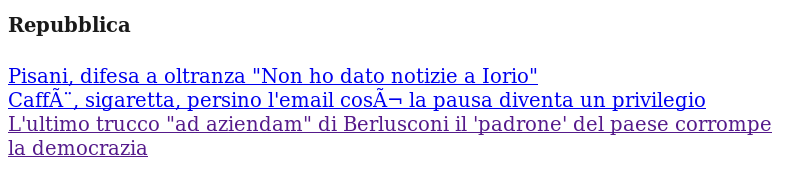
(in case it matters, this happens on Fedora 14 x86_64). As you can see, the accented letters are messed up. Similar things happen with quotes and other non-ASCII stuff. How do I fix this? Before I added the encode("utf-8") command it looked even worst (**), but there’s something still missing here. I have tried to figure out what, but I must say the relevant Python documentation isn’t so simple and easy to find (or recognize at least), so your feedback is very welcome. Thanks!
(**) this is why I believe that the problem is, and should be fixed, in the Python script itself and not in the other script that creates the HTML page, but I may be wrong. Regardless of this, I want to understand better how encoding is handled in Python