Flash/nVidia horrors, Gnome/KDE fights in my Fedora 14

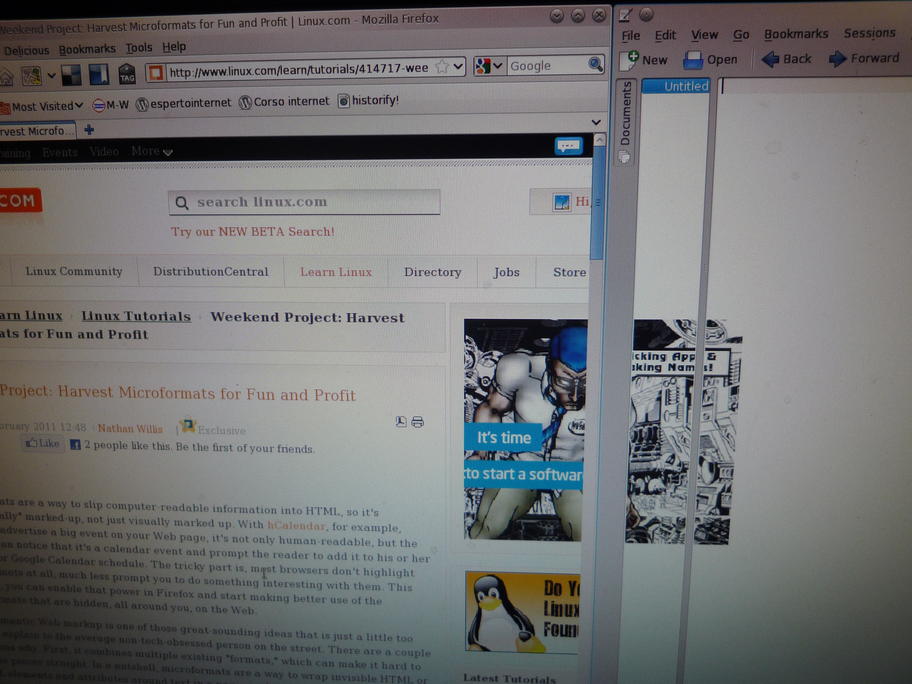
. Just a few days after I had brought back my Fedora computer to life, the last updates in kernel, nVidia driver from RPMfusion and what not did to my Fedora 14 box (the same that was damn slow three weeks ago) what you see in these pictures, taken while visiting a recent Linux.com article on microformats (sorry for their quality, but I had to take pictures because screenshots wouldn’t show the “sticky ad”). It happens on other websites too.
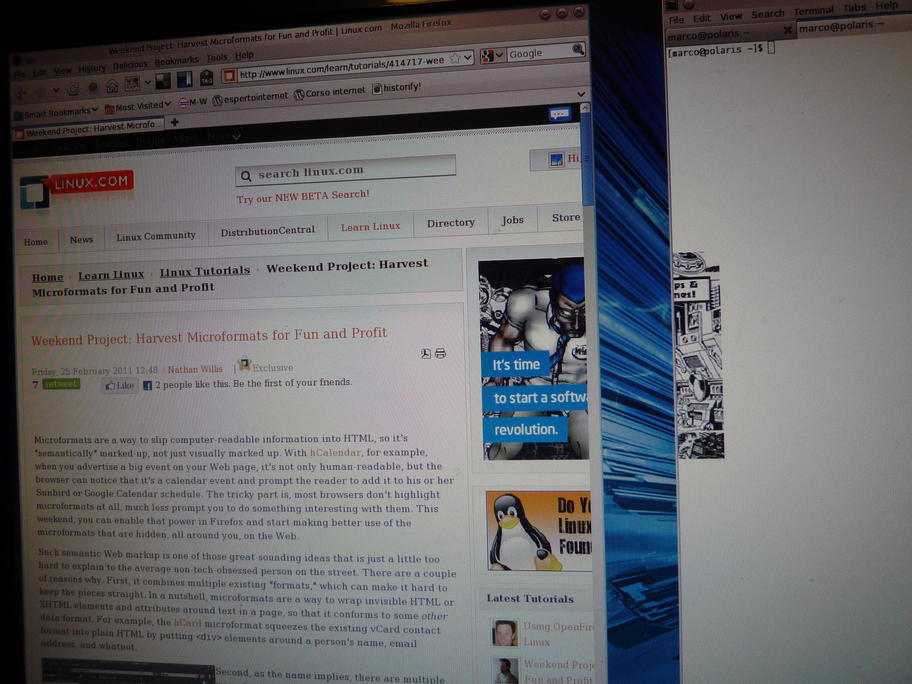

Basically, whenever I loaded that or other web pages that contain a Flash ad, that ad would remain on screen. This made working impossible again. Sure, theoretically I could block Flash, but there are a few websites that I must use to work that only function if Flash is enabled.
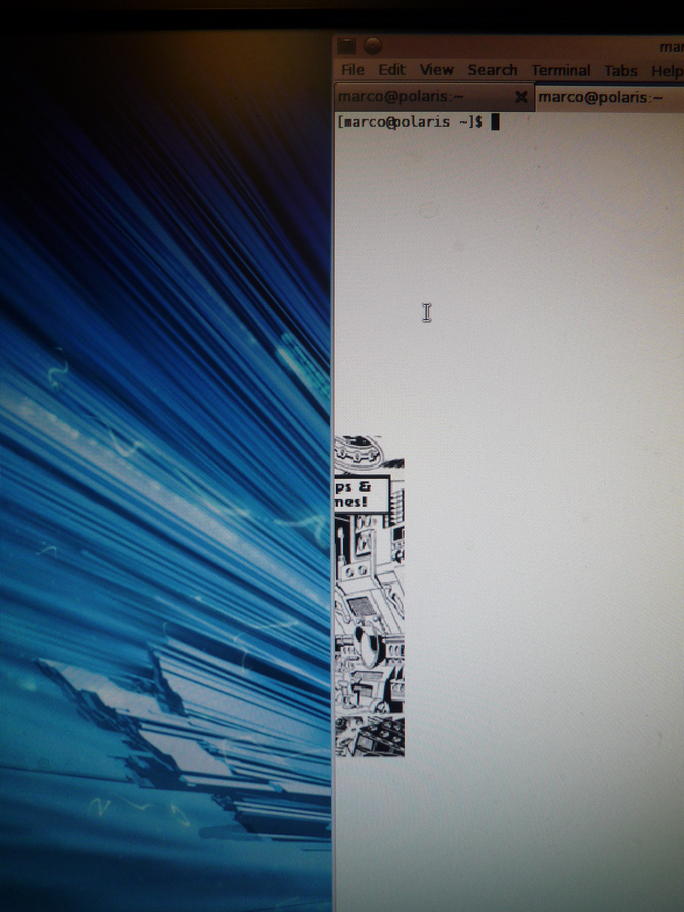
If I moved Firefox to the right part of the screen, that square ad would remain in the center, where it had appeared when I had originally loaded that page. Every other window that happened to occupy part of that initial square area would have that part covered by the corresponding part of the Flash ad.
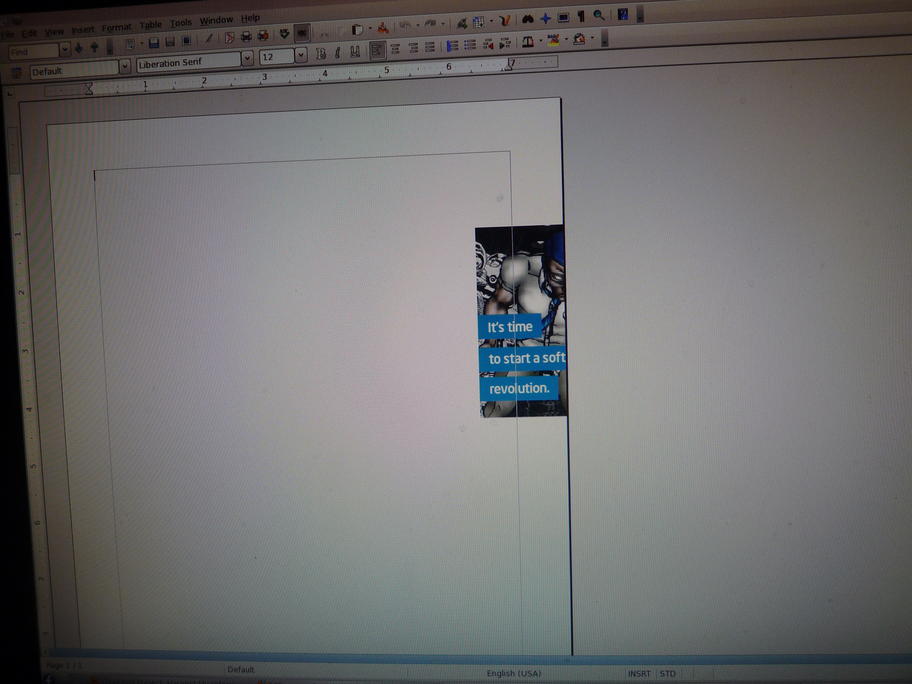
As you see in the pictures, the ad didn’t stick on the root window, or on the borders of each window. Only inside the windows. Closing or killing Firefox would make no difference, the ad would remain on screen. The only way to make it disappear would be to restart X. In KDE, it always happened (I tried 10/12 times). In Gnome, it only happened once or two.

Since 1) at least part of the problem was outside Firefox, 2) several comments to my previous post said that Chromium isn’t really that fast with many tabs open and 3) X wasn’t really smooth anyway, I wasn’t really motivated to try Chromium. Seeing no other solution, this morning I removed the nVidia drivers:

  yum remove kmod-nvidia nvidia-settings nvidia-xconfig livna-config-display


And the Flash ad problem disappeared. Not only that, but the whole graphical environment runs a bit faster and more smoothly than before. The computer is not as fast as I’d like (they never are, aren’t they?) but is much better than before. I got here by doing without the nVidia drivers and cleaning periodically the Firefox Sqlite databases. As soon as possible I will also try other tricks that were suggested. I am not completely happy, because I have 3D hardware that I can’t use to the best of its capabilities right now, so Google Earth runs much slower than it could. But I am already back again to a point where I am the performance bottleneck of my desktop, so that can do.

Along the road, I discovered some interesting “communication problems” between Gnome and KDE. One is that if I put an USB stick in during a KDE session, I couldn’t unmount it from the KDE panel. I had to start Nautilus and unmount it from there. This disappeared after the last upgrade, the same that introduced the “flash ad that wouldn’t die” problem. I also tried to prepare the live CDs with Brasero from a KDE session, but it core dumped like this:

  [marco@polaris ~]$ brasero &
  [1] 4010
  [marco@polaris ~]$
  ** (brasero:4010): WARNING **: ERROR loading background pix : Failed to open file '/usr/share/brasero/logo.png': No such file or directory
  ** (brasero:4010): WARNING **: Failed to inhibit the system from suspending: GDBus.Error:org.freedesktop.DBus.Error.ServiceUnknown: The name org.gnome.SessionManager was not provided by any .service files

Starting the abrt gui from KDE yelds similar problems:

  [root@polaris ~]# abrt-gui
  Can't connect to gnome-keyring-daemon, changes won't be saved

Finally, if there are two users logged in at the same time, one with a KDE session and one with a GNOME session, when you switch user from the GNOME one to the KDE one, the latter has to enter his or her password twice. One for the GNOME screen locker, another for the KDE screen locker.


It’s funny, so to speak, to find (9 years after writing Hooray for Bluecurve) that KDE and Gnome still have this kind of cohabitation problems. Mind you, I’m not even really complaining here, just sharing what I’ve found to exchange tips and tricks. Feedback, as always, is very welcome. Personally, I have no time right now to investigate this in depth, for the reasons I just explained in another page, but there are hints (I hope) to solve these problems in these threads:

Did you like this? Share it:

About marco

Author of the Digital Citizens Basics online course. Freelance writer and trainer specialized in digital rights issues
This entry was posted in Uncategorized and tagged , , , , , , . Bookmark the permalink.

23 Responses to Flash/nVidia horrors, Gnome/KDE fights in my Fedora 14

  1. Pingback: Update on: Why is my Linux so damn slow? | Free Software Tips and Tricks at Zona-M

  2. Matt says:

    Have you tried another browser outside of firefox? I’ve read several places about issues with x + nvidia + firefox. Give Chromium a try.

  3. I had a similar problem with flash and nVidia. However, I was able to resolve the problem by setting both of my monitors to use “Auto” for the screen resolution and refresh rate, set from the nVidia control panel.

  4. marco says:

    Thanks Matt, Zauber!

    @Matt: see article. I have Chromium installed, but since I found X to be not so smooth even with no browser at all, I didn’t do extensive testing yet.

    @Zauber: I confess I haven’t tried those nVidia settings. I will, for sure, when I have time again.

  5. a says:

    run a whitelist for flash blocking

    • marco says:

      As I explicitly say in the article, there are some sites that use Flash, and that I need to visit with Flash enabled because otherwise I can’t work on them. I have shown in the pictures here an example from Linux.com, but only to give readers something to test with if you like. Otherwise I’d have blocked Flash and forgotten about this long ago.

  6. ju2wheels says:

    I had this issue yesterday, switch virtual terminals temporarily and it should fix itself when you come back to the vt running X.

    CTRL+ALT+Fn…

  7. DGSCronos says:

    I had the same problem (also an Nvidia card). It seems the new Flash 10.2 doesn’t work very well in Firefox. But it behaves okay in Chrome (not Chromium). The Chrome version has the latest Flash already built in. With that I have little to no problems with Flash content (youtube & ads). Maybe it’s worth a try.

  8. Nitroflow says:

    @DGSCronos That’s because chrome comes with it’s own flash plugin so you are not using the same flash plugin used by firefox and chromium.

    Solution: downgrade to flash 10.1 until these bugs are fixed probably in the next flash update.

  9. Mark says:

    I’ve read a little of your performance problems. I have to say that I see none of these problems nor none of the artifacts that you mention.

    My system is quite a bit less powerful than yours. I’m running Fedora 14 on a 2.67 GHz P4 with 1.5 GB of memory and an over-clocked AGPx4 7600 GS card. While it’s slow with Flash, it is tolerable. I do run Strigi and Nepomuk (although I’m careful what I index) and I do have the desktop effects enabled with the default settings.

    I do not use the rpmfusion repository drivers. They are rarely up to date, and according to people on the NVidia forums they create problems.

    I build my own from the NVidia download site, and also manually clean up some of the previous shared libraries. It turns out that the NVidia installer doesn’t clean up previous installations very well.

    I have a module config file in /etc/modprobe.d that tweaks AGP settings to enable sideband addressing. This improves my card’s performance.

    I use a custom xorg.conf file, where I set the DPI and enable CoolBits. In my .xinitrc I run a script that over-clocks my GPU and sets a few options. This also improves my performance.

    The end result is that I have a reasonably responsive system with no artifact issues in Gnome, KDE, or Windowmaker (my three GUI environments).

    As for Flash, I block it with Flashblock on both Firefox and Chrome. I can white list the sites that require Flash, but I don’t find clicking on the Flashblock icon to be a big problem. There are a few sites that don’t work with Flashblock enabled (even when clicking on the Flashblock icon). Those sites I white list.

    In short:

    1. Use the official driver
    2. Customize your xorg.conf (you won’t be able to over-clock your card – driver bug)
    3. Use Flashblock and white lists

    As far as Gnome and KDE not getting along, there are actually a lot of issues. I recently had my KDE menus reset to the Gnome menus when trying out some things in Gnome. The recovery wasn’t too bad, but like you I wish they would coexist better on the same machine.

    As far as Brasero, I see the same error. However, that file does not exist (verified with find), and an rpm -q brasero –filesbypkg | grep logo results in no hits. Doing a strings /usr/bin/brasero | grep logo shows /usr/share/brasero/logo.png, so maybe this is a packaging bug in the Brasero rpm?

  10. Ivan says:

    So, block the ad. The problem isn’t nVidia or Adobe, its the piss-poor coding that goes into the flash adverts.

  11. Pingback: Linux News » Flash/nVidia horrors, Gnome/KDE fights in Fedora

  12. Dhanar Adi Dewandaru says:

    I guess you’re using GeForce with VDPAU support and the new flash 10.2.

    You might want to try this one (as root):

    #mv “/usr/lib/adobe-flashplugin/libflashplayer.so” “/usr/lib/adobe-flashplugin/libflashplayer.so.orig”

    # xxd -p “/usr/lib/adobe-flashplugin/libflashplayer.so”

    This will back up your original libflashplayer.so and patch it so that it cannot find libvdpau.so.

    This command has been tested OK in Debian Squeeze. Use at your own risk!!!

    • Dhanar Adi Dewandaru says:

      WHOOPS!!! The second command in my previous post was cut off….

      I’ll try again:

      # xxd -p “/usr/lib/adobe-flashplugin/libflashplayer.so”

  13. Brian Sullivan says:

    Use the ad block plugin for Firefox. It will block flash ads only and leave the rest of your flash needs intact. I do this all the time. Constantly using flash on websites but block the problematic flash ads. It’s not really blocking flash ad it’s blocking the ad network links on the page from loading. Makes surfing much faster and gets rid of the wasted space on the web page that ad use leaving more viewable information.

  14. Warren P. says:

    Dude. ….. Flash sucks! But you blame Gnome, and KDE, and video drivers, for what in the end, is a hairy flash internals problem?

    This *SAME* problem happens to me in Windows, on Chrome, with Flash. I can’t fix it any way other than to completely block flash. No video driver changes on Windows help me either. Your problem is because Flash (which is NOT OPEN SOURCE) is a piece of broken buggy closed-source crap. A piece of crap that you rely on. But a piece of crap none the less.

    You think (from your other blog post) that this is a problem with open source? A war between KDE and Gnome? What happened to your cognitive functions, dude?

    Warren

    • marco says:

      Warren,
      next time, read before replying, please.

      First, Flash sucks, but what is happening here when it runs also depends on whether is KDE or Gnome running: “In KDE, it always happened…”. Secondly, I did write everything in one page because it wasn’t so much stuff to deserve two posts and it happened all together, but I have clearly separated both in the title and in the post what is directly depending on Flash/nVidia and what is Gnome/Kde problems that exist regardless of Flash: “Along the road, I discovered…”.
      Third: there is no war between Gnome and KDE. There may be, however, not enough cooperation. And do read the Is Linus’ Law still valid? post before telling me I should fix those bugs or lacks of interworking myself.
      Finally, more than a problem with Open Source (but this is being debated right now in that other post, read the comments to it) I see a problems in FOSS advocates that still repeat slogans like Linus’ Law without realizing that they don’t make much sense as they used to in the 90′s

  15. Ash says:

    You could have either
    a) selectively blocked only the ad via a Firefox add-on such as AdBlock Plus.
    b) selective allowed only the wanted flash apps with a add-on such as Flashblock

    Since it seems using the free Nouveau drivers is working for you, neither of the solutions I’ve just mentioned are necessary… but you might still want to consider AdBlock Plus, as it makes web browsing quicker (ads are simply not downloaded or run), and makes pages appear cleaner with less distractions.

  16. Pingback: Is Linus’ Law still valid? | Stop

  17. Alejandro Nova says:

    About the KDE vs. GNOME fight, you can kill almost half of it by upgrading to KDE 4.6. Add the YUM repositories of KDE-Redhat:

    /etc/yum.repos.d # wget http://apt.kde-redhat.org/apt/kde-redhat/fedora/kde.repo

    After the upgrade, remove HAL. KDE 4.5 uses HAL, but KDE 4.6 uses UDisks, just like GNOME. So you can unmount drives from KDE just like you do from GNOME. Check if the upgrade fixes the rest of your issues.

  18. qosys says:

    nice, solved this problem by removing nspluginwrapper. Try this, it could help.